


5 easy ways to improve your learning platform’s UX

It’s no secret that User Experience (UX) is key for your learner’s success. There are a number of complex ways to make your UX shine and make it pleasing to use. But why don’t we start from the basics?
These are 5 easy ways you can improve your platform’s UX.
1. Landing Pages are Key
You never get a second chance to make a first impression. The first experience a user has of your platform is the landing page. Putting effort into making the landing page clear and intuitive will change how users ‘feel’ about logging on to the platform. A mistake we often see is overwhelming the user with too many options, content and information. Keep it simple, clean and sign-post what to do next.
GuyKat tip: Use images authentic to your brand. Authentic look and feel encourage learners to interact with training materials, as it provides them with a sense of professionalism and motivation.
Related content: How building a custom landing page enhances your UX.
2. Use attractive calls to action
In order to properly optimise your learning platform, you need to understand what you’re optimising for. Ask yourself these questions:
- Do I want my learners to browse by regional or functional content or have access to all?
- Does an individual learner have specific learning paths they need to follow?
- Is my content organised or allocated based on roles?
Depending on your answers, you will know what are the key things to optimise on your platform.
For example, if your learning content is organised based on the region, on your landing page you might have a map with clickable regions to take the learner to the correct region training site.
3. Be mobile-friendly
This one is a no brainer. In the digital world, it’s imperative to optimise for mobile, as users will want to access content from a variety of devices. Remember that to get the end-to-end user experience right both the platform AND the content need to be mobile optimised.
Related content: Check how Amnesty International optimised its platform for mobile, and had a peak in registrations.
4. Avoid Screen Clutter
Having unnecessary tabs, widgets and titles will frustrate the user. Keep it simple, determine your keywords and key actions which will allow smooth navigation through the platform.
GuyKat tip: Including keywords in your titles and headings is also important for targeted messages.
5. Write Succinctly
Ensure the text on the screen is concise. Read every sentence. If a word can be removed without changing the meaning, remove it.


User generated content: Why is it important and how to use it effectively
The original version of the article written by GuyKat’s Joanne can be found on LinkedIn here.

Let’s start with the basics: What is user generated content?
Within the context of your Learning platform - user generated content is any “unofficial” content (e.g PDFs, videos, tutorials, articles) that is created and/or shared by your learners.
Why is it important?
User generated content allows you to benefit from the wealth of knowledge and real-life experience of your learners. If you provide an area for them to share tips, tricks, workarounds, tools, best practices - you’ll quickly identify your ambassadors and foster a company culture of continuous and “pull” rather than “push” learning.
Additionally, this year there is the additional challenge (when a large number of people are working remotely) to ensure teams still feel connected. A platform that allows social learning and promotes user generated content can be further leveraged for team activities and reduce the sense of isolation.
I’m concerned about learners sharing inappropriate content - how can I combat this?
I’ve had a few clients that are concerned about providing an open forum in their Learning platform for users to contribute content to - particularly if user generated content is a reasonably new concept within their organisation. I completely understand that there can be reservations over whether the content is appropriate and has the right level of quality. In response to this, I would suggest requiring expert review before content can be published.
If your Learning platform has this option, having this setting enabled means that you can allow your learners the option to contribute content, however, Admins will need to review it and consciously make a decision to approve or reject it. This can help you to control the quality of submissions.
Ok, I’m convinced and ready to start encouraging user generated content - where do I start?
- Identify a small group/team within the organisation to participate in trialling this initiative.
It could be a specific division, region or type of role but there should be a willingness to share examples of the kinds of user generated content that may already exist and could be leveraged e.g guides, tips, knowledge shares as well as suggest other ways it could be utilised.
- Establish your rollout strategy - whether you’d like to start small (e.g permit specific users to add content/review and approve or reject content that has been submitted) or whether you’d like to allow learners to freely contribute.
- Think about whether you want to have categories for different types of user generated content to make it easier to find.
You could have a “Tips and Tricks” area, “Best Practices”, “Tools” or even areas that promote more fun/social activities such as a “Get to know me” with short videos that your users can film on their smartphone and easily upload.
- Wherever you’re asking users to share their user generated content (e.g through an LMS) - get an expert to put together a short video on how they can do this. It should be short, concise and easy to replicate.
- Allow the team to interact with, rate and respond to content - iterate if needed before rolling out to the wider team.
- If your system permits - encourage users to contribute content by utilising gamification and rewarding top contributors with badges!
In conclusion
It’s important to understand that user generated content should never, of course, be used as a replacement for formal training, rather it can be a powerful supplement to it. The reality is that the most successful learning strategies have a blend of training approaches (variety is the spice of life!) - eLearning, video, in-person training, mentoring/on-the-job shadowing… User generated content is something that when implemented well can help further enrich the learner experience and boost engagement, knowledge sharing and employee advocacy.


Tailoring your learning content to your audience

“Being involved in every step of the process allows me to help tailor the content to its audience and create a well-rounded learning experience for the user”,- says Cathy Turner, GuyKat’s eLearning developer and designer. In this report, she helps us to understand the importance of tailoring your eLearning content to your audience.
Why is it important to tailor your training to different audiences?
Different audiences require different approaches. Just as TV shows and movies are made to target certain demographics, we need to do the same with our eLearning to ensure the information is transferred to the user in the most effective way. One of the most important questions we ask our clients before we begin development is ‘Who is this training for?’. We need to know who we are aiming the content at; the age range of the learners, their pre-existing knowledge of the topic in question, if they have taken a course like this before and so on. Knowing this information can drastically change how we design and develop our content and affects everything from the look and feel of the course to how long it takes to complete. If a user already has a basic understanding of the topic being covered, then a more in-depth look will be more beneficial to them than trying to teach them what they already know. On the other hand, for someone new to the subject, a high level of detail could be intimidating and an introduction to the basics may initially be required.
GuyKat tip: Ask your clients before the beginning of the development 'Who is this training for?'.
How do you know what will be most effective for your audience?
Asking the client for information on their users is a great start but try to also look at existing training and find out what works well and why. If you can, keep track of user results and metrics, such as how long they spent taking the course, if they paused it and at what point, if a particular question received a low average score and so on. This could clarify issues with the training and help you pinpoint where users may have lost interest or struggled. Post-course surveys can also be a good way to gauge how well users responded to a course and if they felt it was effective. Understanding the behaviours and interests of an audience is something you learn the more you continue to work with them, and you may find patterns start to emerge among certain demographics. At university, I focused on young audience eLearning, whereas here at GuyKat we create mainly corporate training for businesses, so I’ve had to learn how andragogy (adult-focused teaching) differs from pedagogy (child-focused teaching).
Having made the transition from developing for children to developing for adult professionals, what are the main differences between those two groups?
At surface level, the look and feel are often very different. Younger audiences tend to respond more positively to bright colours and a cartoon-like style, with fun, cute characters that can act as a teacher or guide for the child throughout the learning experience. Whilst you may find corporate training that utilises characters or colourful graphics, it tends to be less common, and only if it fits the branding guidelines of the business.
Children also tend to have shorter attention spans than adults, so it is especially important when creating eLearning for a young audience to keep the content varied, fun and interesting! Drawn-out exercises and long paragraphs of text should be avoided or broken up by games and interactions that increase the involvement of the user. With adults, it is possible to spend more time on a single task, and they are more likely to read through the content. This doesn’t mean you shouldn’t try to add in games to a module aimed at adults! But it does allow you to go into more detail for a longer period of time whilst maintaining the attention of the user.
Also, the content in young audience eLearning tends to be simplified and is often a subject taught globally. If it is part of a school curriculum then the module is likely to have a longer lifespan than training for the corporate sector, as the information is less likely to change. Corporate training may need updating more frequently as practices improve or new technology is introduced to a workplace, and it is more likely to go into more detail on a specific subject.
Having made the transition from developing for children to developing for adult professionals, what are the main similarities between those two groups?
Both adults and children love games! The younger the audience the more necessary they become, but having an interaction that requires the user to engage and respond in a fun way is beneficial to the learning experience no matter the age group.
They also share many of the same benefits. In a time where employees are increasingly beginning to work from home, eLearning allows employers to train recruits no matter their location and they can learn on the go or access resources from home. It also reduces the large costs of the classroom and in-person teaching, making it more accessible and providing opportunities to greater numbers of people.
Also, both aim to innovate and use new technology to teach in different ways. We are seeing a rise in the popularity of responsive eLearning and mobile-friendly content, both in corporate and young audience eLearning, and ways to harness technology like AR and VR have been implemented in schools and businesses alike, enhancing the experience of learners of all ages.
GuyKat tip: Include interactive elements such as games! For both children and adults.
What should you consider when creating an eLearning module for children?
As I mentioned previously, young learners can get bored and distracted easily, so try to keep them busy with a variety of interactions. Short videos, games, quizzes and animations are easy to add into your eLearning and make a big difference to the user experience. Even resources they can take away with them, like a printable worksheet or instructions for an activity they can do once the course is over, can help make sure the learning continues even after they have completed the module.
What should you consider when creating corporate eLearning?
It may be hard to believe but adults often tend to be more nervous to learn something new than children! The fear of failure may cause them to feel anxious or take an apprehensive approach to activities, so encouragement and positive reinforcement could be required in order to motivate them to continue. Adult learning should be steadily built upon and supported to avoid losing focus.
Adults are also usually more goal-oriented than children. They are either taking a course as a requirement of their job, in which case their goal is to complete it and receive a qualification, or because they have chosen to broaden their skillset. Either way, make the goals of the training clear upfront and ensure they are achieved by the end of the training. You could implement a function that allows the user to tick off objectives as they are completed to help them feel a sense of progress.
Whoever you are creating eLearning for, it is important to remember that people of any age are learning most effectively when they are motivated, challenged, involved and having fun!
GuyKat tip: Make the goals of the training clear upfront and ensure they are achieved by the end of the training.


The 5 Step Process To An Effective eLearning Project
At GuyKat we partner with our clients to create online learning experiences. Our development process is based on the ADDIE methodology... with a twist!
The 5 step process is outlined below:
1. Analysis
We start by getting a clear understanding of the client's use-case and specific requirements. This initial discovery will involve:
- Understanding the vision, what do they want to achieve
- Taking a look at any content the client already has - this doesn't have to be perfect
- Helping the client understand the possibilities of how the content could be delivered
- Alignment on the delivery, is the module going to have narration, will it be bite-size or a suite of modules
- The sometimes awkward, but necessary conversation about budget and how we fit into that
- And finally, the timelines for delivery
At this stage, we find clients fall into one of two groups:
a. Someone who knows what they want
They might have all, or part of the content ready to be developed, or have the content that needs storyboarding
b. Someone who needs our help to figure out what they want
They need help in developing everything from scratch
Before we get started, it’s important to align expectations about the clients’ quality ambition versus budget. To help frame this conversation, we mutually agree if we’re working to our Bronze, Silver or Gold development levels. With the development standard agreed, we can begin working on the storyboard.
GuyKat tip: It's tempting for subject matter experts to want to share EVERYTHING they know into a module. Avoid overwhelming your audience. Only share what is necessary to achieve the learning objective. This also helps keep learning bitesize and helps with completion rates.
2. Design
Storyboarding
A storyboard is an outline of the final module. It is a sequence of drawings, typically with some directions and dialogue, representing the shots planned for an eLearning module production.
If our instructional designers are writing the content, then storyboarding is the next step (if the client is providing the scripts/storyboards ready written, we skip this step).
Typically, we get PowerPoints from clients as a starting point. It might be a deck from when they taught the same topic in a physical classroom, or it may be something they've put together to help our team understand the subject. Our team works with this input material and shapes it into a proper storyboard for our developers to work on.
Storyboarding includes:
- If it is an audio led module, it will include a script of everything that’s going to be narrated
- Developer notes (such as drag and drop explanations around activities)
- The development of concept art (mockups of the modules)
GuyKat tip: We always encourage our clients to include learning objectives. Sometimes they are explicitly referenced in the content e.g. you may have a screen that tells the learner "By the end of the module you will be able to explain the procurement process". Sometimes, you may not want to be so explicit to the learner. Either way, you need to make sure that every part of the storyboard is supporting delivering a learning objective, else why is it there?
The first draft sent to the client.
At this stage, the subject matter expert of the client’s internal team will review the storyboard and leave notes as well as comments of what they like/dislike. This is a key part of the QA process. It is much easier, quicker and cheaper to make changes to a storyboard in PowerPoint, than make changes to a developed module. The feedback on comments can be done over email or call (client’s preference). However, in most cases, it’s always more beneficial to discuss it over a call.
GuyKat tip: Ask, ask and ask questions. Also, make suggestions and let us know what you do and don’t like.
Storyboard phase 2
A storyboarding expert works on the storyboard taking into account all of the comments and feedback received from a client. This once again goes back to the client, to check if they’re happy with it going to the development stage.
3. Development
Buildout
The final version of the storyboard is sent off to the eLearning developer. This is as straightforward as it can be - the start of the development!
Internal QA
GuyKat has an internal QA process that takes place before anything goes back to the client.
4. Implementation
Client review
We like to offer 2 rounds of review for the client without any incremental costs. The first draft of the module will be sent in the Articulate review site. The client will be able to go through the module and make comments, suggestions and highlight the things they like.
GuyKat tip: Always let your account manager know you finished reviewing!
The official sign off
Once the client is happy with the final result - we’re happy to wrap up the project. And hopefully, start the new one!
5. Evaluation
Client feedback
Capture any client feedback to ensure the module has met the client's needs. To achieve that, we send out a Project Feedback survey to the client.
Internal feedback
Arrange Project Closing meeting with internal employees that were involved in the project.


How to motivate a sceptical learner
The original version of the article written by GuyKat's Ru can be found on LinkedIn here.

Why do people do what they do? It’s because they have needs and wants. A need is a basic goal such as keeping yourself nourished. A want is a particular form of consumption used to satisfy that need. In Learning & Development, the ‘need’ is to stay on top of the game, while the ‘want’ is the type of learning selected to satisfy that need. All professionals have the 'need', but it can be difficult to find a form of 'consumption' that motivates a person's desire to satisfy the 'need'. So it is our job to create the 'want'.
Luckily, we have two types of motivation to help us out with that:
Extrinsic motivation is reward-driven behaviour. It’s a type of operant conditioning. Put simply, this means driving the best behaviour by using rewards. A great example of this is being paid to do your job. You may enjoy hiking or watching your favourite TV show, but you are still motivated to go and do your job because you’re extrinsically motivated by the ability to spend money. However, it does not necessarily have to be a tangible reward. It can also be done through abstract rewards, such as praise and recognition.
On the other hand, intrinsic motivation is when internal forces like personal growth, or a desire to succeed stimulate you to finish a task. Intrinsic motivation is also about activities that are challenging, interesting, and internally rewarding without the expectation of any tangible reward.
All ambitious professionals have the need to stay on top of their game. They know they have a need to keep up. Consequently, professionals want short, engaging and rewarding experiences to satisfy those needs, as they are busy with their day-to-day responsibilities.
Understanding the theory of extrinsic and intrinsic motivation gives us insight into ways we can create a sense of ‘want’ for our training. This knowledge helps us build a learning culture.
So, what are the key 5 things you can do to enhance your learning culture?
1. Make sure you employ people with a passion for learning.
It all starts with the right people. Don’t be blinded by technical skills, mindset matters equally. It’s important to get a clear sense of how the candidate can grow in the role and if they’re willing to invest in themselves and the company by continuous improvement. Robert Half’s research highlighted the importance of training both when onboarding new employees and after which supported the fact that more successful hires are the ones who are interested in learning and upskilling.
2. Create a reward scheme.
Extrinsic motivation factors create a need for recognition and reward. Why don’t you create a reward scheme? Start with listing the accomplishments you think are worth a reward. Tie goals with rewards. This will not only extrinsically motivate your learners to complete training but will also strengthen your company culture. This doesn’t have to be physical rewards for completing training (though it could be). You could have ‘leaderboards’ or virtual badges where the intangible reward is kudos. In many working environments, the power of kudos shouldn’t be underestimated.
GuyKat tip: To put this insight into action, the Docebo gamification app features a Reward Marketplace, that you can read about here.
3. Grasp that content is as important as the platform.
For intrinsic motivation factors, it all comes down to eLearning content you are working with. Many professionals still think that the learning platform is the key element in corporate learning. According to Fleming’s styles of learning, 5 key ways to memorise information are visual, aural, reading, kinesthetic and mixtures. Good eLearning has all of these combined, which ultimately results in the best possible solution to satisfy the ‘need’, which we talked about earlier. It’s indisputable that the look and feel, flow and execution of the platform is key for the success of Learning and Development. However, not all the efforts should be focused on only that. eLearning content plays a vital role in your learning strategy. Even if your platform is the best out there, poor content won’t help you deliver expected training results. Both parts, content and platform, are important and you can’t do one successfully without the other. However, ‘content is king’.
Related content: Tailoring your learning content to your audience.
4. Find an agency that knows good eLearning.
Most people reading this will have experienced terrible eLearning. Hopefully, most have also experienced at least some good eLearning. The former demotivates, the latter enthuses. We want to enthuse. The challenge for us all is, therefore, to consistently deliver the good. All training needs to be tailored to the specific needs of the audience. Luckily, if you partner with an agency that knows how to do it - you won’t have to worry about any of that.
5. Be an ambassador yourself.
If you are the Head of Learning or Account Executive who’s passionate about learning - communicate that with others. Nothing compares to human communication. Speak upon how much you love learning, why you think it’s important for you and the company and others will follow. Become an ambassador for those who need a little bit of a push and you’ll see how quickly the motivation grows.


The ultimate checklist for successful multi-country rollout
At GuyKat our team have been involved with and led many multi-language, international rollouts of software solutions. We’ve developed strategies to help clients manage and ensure successful onboarding of countries and amassed some tips along the way! Our LMS Consultant Joanne Payne is sharing key takeaways of the successful multi-country rollout:
1. Establish your roll-out strategy before you begin implementation where possible.
Is there a pressing need for a ‘big bang’ launch with your software solution being rolled out to several countries in parallel? Or are you intending to pilot in one country initially, gather feedback and fine-tune your set-up before sequentially rolling out to other countries?
That is a question of horses for courses. The key is to document requirements that are core to your business regardless of location (e.g an integration with SalesForce) versus at the country level (e.g ability to integrate/support WeChat in China) to establish complexity and help with your project planning.
By taking the time upfront to consider these questions, you’ll have a clearer strategy for your vendor (or at GuyKat we much prefer being a Partner) to help you with.
2. Be careful when configuring the core components of your platform that will affect any subsequent countries.
We’ve had clients that have made configuration choices when launching in one country that is difficult to reverse or unpick later on down the line to allow other countries to easily join the platform. Certain areas of your system are inevitably going to have a site-wide impact - ensure that you have someone in your team to understand what these are and make an eyes-wide-open choice about how to configure them!
GuyKat tip: Keep an offline document of the configuration and decisions made during the original implementation for easy reference.
3. Be consistent throughout configuration with your naming and code conventions.
If we take Docebo as an example we recommend our clients implement a clear code/naming convention for certain details.
It may seem a minor step, however having this in place encourages data integrity and cleanliness across your platform, allows for clearer identification of which items belong to which country and cleaner reporting.
4. Establish what elements of your platform will be core to all countries joining vs where local flexibility is permitted.
Some of the most successful country rollout strategies we’ve been involved in are borne out of investing time and effort to get the first version/implementation right from the very start, with only minimal tweaks required later on down the line.
A great example of this is a client we worked with to implement their LMS firstly in the US. We developed a strong first version with a beautiful landing page experience and established a bespoke strategy to be used during a country onboarding.
With this understanding in place, our team developed a tailored onboarding process for this client so we could clearly speak to what items need to be fixed as they are core to brand identity (e.g the structure of their landing page is the same across all countries, they have the same brand video) along with areas that could be locally updated (one country could have an area for “Meet the Team”, another might use it for a “Social” page).
GuyKat tip: If possible, we recommend doing a pilot project. That is when a selected country goes live first. A pilot project tests all the assumptions about the use of the system in ‘the real world’ and allows configuration to be tweaked if any issues arise. With a strong proven ‘template’ you can then establish a clear onboarding process for other countries, including what elements are fixed at a global level versus what can be tailored locally.
5. Establish governance and an escalation process.
When there are multiple countries on a single platform it can present concern around how many Superadmins (with full visibility across all countries) you should have versus what responsibilities are left with the local country lead.
As a general rule, you should only have a handful of Superadmins on your platform who can make core changes for all or specific countries. Ensure there is a clear understanding of what can be done by the country administrator vs what actions require Super Admin approval or involvement. This will help eliminate confusion and frustration across your team regarding accountability.
6. Ensure there is regular communication and opportunity for local country admins to provide feedback.
It’s easy to fall into business as usual post-implementation. This results in not checking in with your local country administrators or roll-out more of the “nice-to-have” features that you may have not incorporated into the initial launch.
Your platform should evolve over time based on new features that have been released and your organisation (or customer) feedback.
GuyKat tip: You could set-up a monthly or quarterly forum to gather feedback from your countries and identify if there are patterns in requests e.g perhaps there’s a desire to expand the social area of your platform, or rollout Gamification.


Gracie's Graduate Trainee Scheme Experience
- How did you find out about the Graduate Trainee Scheme at GuyKat?
As I was nearing the end of my MSc International Business degree, I wasn’t entirely sure about the direction that I wanted my career to go in. All I knew was that I wanted to work for a leading company that supports its employees’ development and fosters an ambitious team environment. Seeking this and foundational business experience, I applied for GuyKat’s Business Development and Administration Associate role on Indeed. Fortunately, GuyKat spotted potential and offered me their Graduate Trainee Scheme instead.
- Which part of the scheme appealed to you the most and why?
Since I’m highly invested in personal development, I was most attracted to gaining broad experience in different areas of the company. This scheme encourages me to learn transferable skills, adapt to new challenges and contribute to a variety of projects. It builds my in-depth knowledge of the company and an industry that I knew little about before. By taking a leap into unfamiliar territory, I’ve been able to stretch my development and career prospects in ways that I hadn’t anticipated while at university.
- You are about to transfer to the third stage of your scheme. Could you please give an overview of the past few months working in the eLearning side of the business?
My experience in the eLearning Projects team has been unique since I onboarded while training our Office Manager and transitioning to remote working. Regardless, my time in the team has been pivotal. Initially, I was assigned a Mentor who taught me how to use the authoring tools and creative software needed to develop professional eLearning. I was also assigned a Buddy, who I could check-in with if I needed any help. My main project involved working with my Buddy to conceptualise and develop a suite of eLearning modules for a major client. I’ve also attended client meetings, helped with quality assuring our products and contributed to improving our internal processes.
Immersing myself into this team has been seamless. By embracing digital communication, we’ve been able to continue collaborating and supporting each other remotely. This has helped me to rapidly develop my technical and design skills, despite having no foundations in either area. The only downside is that I’m moving on soon, while there’s so much left to learn. However, I’ve accomplished a lot and I look forward to embracing the new opportunities that my next rotation presents.
- So far, what have been the highlights of your scheme?
It’s been exciting to experience our US expansion and welcome all of our new team members - both in the UK and the US. As the Business Development and Administration associate, a big highlight for me was moving to our new Birmingham office. I managed our assets during this move and got to experience our growth first-hand. During this rotation, I also got to establish our back-office processes, assist with recruitment and train our new Office Manager.
In the eLearning team, it’s been rewarding learning how to use various creative software and developing my design skills. The biggest highlight has been working with my Buddy and receiving positive client feedback for our project. It’s also great having the current challenge of revamping some marketing materials.
- What do you enjoy about working at GuyKat?
Even as the team grows, I think that we remain tight-knit and inclusive. I’ve loved our pub lunches, Christmas parties (yes, multiple) and spontaneous social events. We have a mixture of people with varying life experience and skills, including a growing graduate community. This means that there’s always someone that I can turn to for support or a quick chat.
- Any advice for students or graduates looking to apply for GuyKat’s Graduate Trainee Scheme?
My advice is to remember that the most important part of your application is your cover letter - CVs without cover letters are automatically rejected. Your cover letter is your opportunity to express your personality, as well as letting us know about your relevant passions and skills. It’s very difficult to gauge your potential without context to support the qualifications and experience listed in your CV.
We invest in people who share our values and our work ethic. If you want to stand out, ensure that your application is tailored to tell us: Why GuyKat? Why this Graduate Scheme? Why you?
Our Graduate Trainee Scheme 2020 is open for applications. To read more about it, please follow the link here.
What’s New: Best-liked Docebo Update in May
In May, Docebo released an update to enable duplication of 'pages' by admins. Jack Rixon, who's a part of GuyKat's Professional Services Team, answers questions on this much requested feature in the recent update.
1. What are pages on the Docebo platform? How are they used and what role do they play in the functionality of the platform?
On Docebo, pages allow admins to customise the look and feel of their system. A well-designed page can transform user interaction with the platform. As standard, admins have access to some templates. This is a quick way to get started. The templates pre-populate the page with Docebo widgets, which can display various types of data such as users’ course stats or their content library. However, if you want to push the platform further then you don’t have to be constrained by these templates. If you have knowledge of CSS or HTML, you can start with a blank canvas and build your own custom page. At GuyKat, we know the CSS and HTML pieces and can work with clients who draw up their ideal of what the system would look, if they can make a simple mock-up of how they would wish the system looked (called a ‘wireframe’ in the jargon), using a tool like PowerPoint - then we can let them know how close we can get their Docebo to looking like their wireframe. More often than not, it is very close.
2. How will the duplication of pages make the platform better? How the duplication of pages will make people’s lives easier? How would that change user experience?
Not every user in every organisation needs to see the same content or the same images on a page. It just may not be relevant enough for them. It is normal for a company to want their manufacturing staff to see different things from their sales staff, or managers to see a different view from team members, contractors to see something different from internal staff, European staff to see something different from Asian Staff etc. This is why, in almost all cases, you will need to create more than one landing page for your users. Previously, if you wanted to create more than one version of a page, you would need to manually create a new page then copy the layout from your original page. This was time-consuming. However, this latest Docebo update allows admins to “duplicate and save” pages, meaning you no longer need to re-create all of the widgets on a page. This is a great tool for admins now, as they will be able to make minor tweaks to their pages much quicker, saving a lot of time. This makes it far easier to more quickly make tailored pages, which is a real benefit for the user experience. Tailored pages lower barriers to user engagement. Everything that makes it easier or quicker to make tailored pages is a win!
If you are interested in partnering with GuyKat for services on your Docebo platform, please get in touch. Click on the contact button below to request a discovery call and describe your requirements.

Selecting the right eLearning format for your content
In this article, one of our Senior eLearning Designers talks about how they help clients decide on the format of their learning.
How important is selecting the right format of eLearning for a project?
Each client and each project is unique. So, at GuyKat we start by looking at the client’s needs, target audience and existing materials. Our aim is to create bespoke learning that delivers their key messages in an engaging and effective way. A key choice we make early on is the format that the eLearning will be delivered in. I think a lot of competitors seem to assume that whatever the brief, the answer must be a traditional eLearning module. It often isn’t. Getting the right format is critical to success.
What are the different types of eLearning formats?
eLearning can be delivered in a variety of formats, on many different platforms. A single course should include a mix of formats to create a well-rounded experience, which could comprise of:
- Traditional eLearning modules*
- Responsive eLearning
- Quizzes
- Scenario training
- Blended learning
- Video (Live action, animated, VR and interactive)
- PDF and ‘takeaway’ documents
- Webinars
- Social learning
What is the benefit of one format over another?
A traditional module isn’t better than an animated video, and a quizzing module isn’t any less effective than a scenario-based course. Which type of format to choose for eLearning depends on the content and desired outcomes.
If a client was looking to confirm a learner’s in-depth knowledge on a new accounting system, to ensure it was safe to give them access, then an interactive quiz would be an appropriate format. A bitesize animated video would best be suited to deliver one specific topic such as Video Call Etiquette in a bright, visual way. If an organisation was looking to embed a new culture into its way of working, a blended approach using a variety of formats would ensure the process is smooth, interactive and aligns all employees to the new way of working. It all really depends on what you’re trying to achieve.
How do you decide which is the best format for your content?
As part of the initial project scoping, asking a few key questions will ensure the content is matched to the right format. These can include:
- What existing material is the client able to provide?
- What key messages need to be delivered?
- Who is the main audience?
- What is the budget and what are the timelines?
- How will the module be hosted?
- What is the most effective way to present this content?
Once the scope has been outlined, the format that best suits the client's needs can be proposed. Budget constraints can usually result in more modest ambition and outcome, but if clients are nervous about trying a different type of eLearning, providing demos or case studies from previous projects can help them push their eLearning to be more innovative and successful.
*By traditional eLearning module we mean the type of content most users are familiar with if they access materials on an LMS. These are typically written by developers using tools such as Adobe Captivate or Articulate Storyline and exported in SCORM format. They may be ‘click-and-read’, or may have various levels of interactivity, audio and animation. For this definition, we are referring to content that is primarily optimized for a tablet or desktop size screen.
What’s New: Best-liked Docebo Update in April
Having worked with multiple different Learning Management Systems in the past, one of the key differentiators with Docebo is its Coach & Share module which fosters a culture of community and continuous social learning. The feature not only empowers learners to search the content but also create and share their own learning, which is the core idea for successful Social Learning. To find out more about Docebo's Discover, Coach & Share click on the video below:
https://www.youtube.com/watch?v=5fF-8YJJ-Ks
In April, Docebo completely revamped Channel Management making life significantly easier for any Admin to create, search, modify and upload content to Channels.
Our favorite functions are:
- The new search bar which means not having to continuously scroll to find any newly created channels.

- The new grid format which includes quick access to view Content that has been uploaded against any channel.
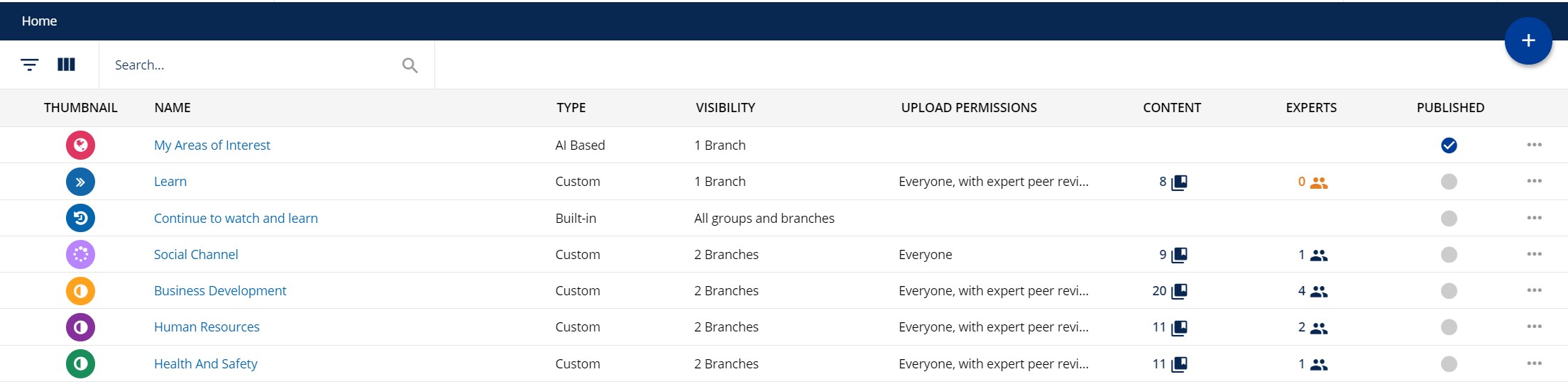
- The ability to define the details, experts, visibility for my Channel all on one page (instead of clicking “Next” to move through each step).
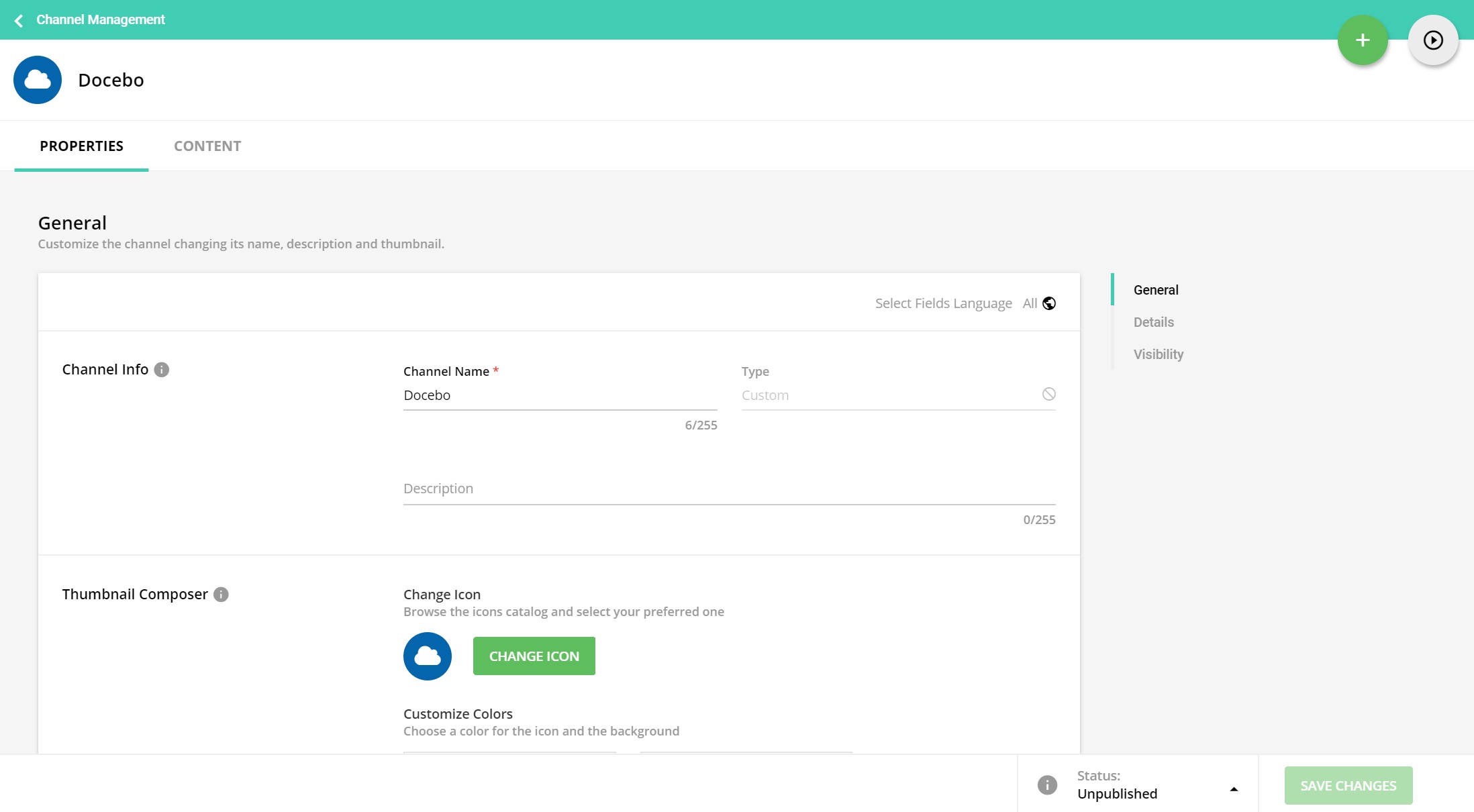
- The ability to directly search and add content when creating or editing a channel.

"Overall, the experience within Channels now feels more modernised, flexible and consistent with other areas of Docebo (Course Management, Menus, Pages) and I’m loving it!" - Joanne Payne, LMS Consultant and the author of this article.
If you are interested in partnering with GuyKat for services on your Docebo platform, please get in touch. Click on the contact button below to request a discovery call and describe your requirements.