


The importance of Social Learning

'Social Learning' has been a buzz phrase for some time and L&D departments may feel under pressure to 'do social learning'. It's important to remember that it won’t be appropriate for every learning need. There is a time and a place. However, in the right circumstances encouraging social learning can be a great enabler for performance enhancement.
What is Social Learning? In simple terms, Social Learning takes place when we learn from observation of others; by watching their behaviours and the consequences or outcomes they lead to. For example, a small child might learn by observing the unruly behaviour of a sibling and the subsequent reprimand by a parent.
If you’re interested to learn more, we’d suggest starting with Albert Bandura’s early work which is often associated with the theory.
Social Learning has always been important; after all it is probably one of the oldest and most natural ways in which people learn. More recently though we’ve witnessed two significant step changes in its application:
- Firstly, advancements in digital technologies have led to a plethora of widely available social and/or collaborative technologies.
- Secondly, we’ve seen a vast increase in organisations who are recognising, embedding & encouraging social learning within their workplace.
We all regularly learn from our peers, regardless of their location or function, using social learning technologies such as wikis, instant messaging, discussion forums and even video. Nowadays, when we talk of 'social learning' in the L&D space, typically we mean social learning using digital technology. This is a narrower definition than the academic one.
What are the benefits of Social Learning?
- Social Learning encourages collaboration in the workplace - if you have an expert (or someone who can help) within your organisation, why would you go anywhere else?
- Beyond the technology investment, the learning itself is often free or of minimal cost.
- Social learning enables you to learn at the point of need and put that learning into action quickly.
- It’s often quick; so has minimal impact on a learner’s working day.
Does Guykat help implement Social Learning? Social Learning is very high on our agenda at GuyKat. We’ve already developed a number of technologies that enable us to build innovative social interactions into our eLearning content. This is an exciting option for our clients. Combining both social and traditional eLearning adds to the learner’s enjoyment of the module, whilst potentially increasing their retention of the content. Done well, this ultimately leads to an increased return on investment.
Do we practice Social Learning internally? Absolutely! We don’t think that GuyKat could function without it! We’re a very supportive team and have created a fantastic culture for collaboration and sharing. We’re quite diverse, in terms of our location, experience and specialism so we tend to make very good use of our messaging forum.
"It never ceases to amaze me how there is always someone there who is able to help here at GuyKat",- says our Learning and Development Consultant Claire Kirkby-Webb.
If you want to learn more how GuyKat can help you implement Social Learning into your daily corporate life, please contact claire.kirkby-webb@guykat.com
Articulate Storyline or Adobe Captivate?
We often get asked ‘which authoring tool is better?’ Captivate or Storyline? We explain that both Captivate and Storyline rock. However, our sense is that if you take two equally bright people with identical skills and you gave one Storyline and one Captivate, then after a couple of days your Storyline user’s content would appear to be better. It would be the same story after a week or a month, after three months they’d maybe be neck and neck, but after six months your Captivate user would be limited only by their imagination while your Storyline user’s material would start to look ‘samey’ (which isn’t to say it is better or worse learning).
Put simply, Storyline has a much shorter learning curve and you’ll look great quickly. The flip side is that you’ll also hit its capability limit sooner and be using hardcore workarounds to extend capability when you attain mastery in a way that you would not if you had mastered Captivate.
So, both tools are great. We'd recommend either. But remember they are just tools. Having a saw and workbench doesn’t make you a carpenter. Having a rapid authoring tool will not make you an instructional designer. Enthusiastic or even reluctant amateurs can and do make brilliant material with these tools. In the modern workplace budget constraints often mean that option is all you can do. However, if you want to train thousands of people, if you have a proper training budget, if you want to concentrate on your day job rather than the technology and if you want the training to truly engage then the DIY approach is misguided. You would likely be better commissioning a professional agency such as ourselves to build your online training for you.
But back to the initial question, if we really had to pick just one, which would we go for? Our company makes eLearning for third party clients, we are doing it all day every day, and we primarily choose Storyline*.
*This is a 2019 update of an article first written in 2012. The most significant change is the very last word which originally said 'Captivate' and now says 'Storyline'. In recent years Storyline has closed the capability gap significantly. Although you do hit a limit in capability with Storyline, that limit is comfortably higher than the bar of 'very professional looking output'. We still are proud expert users of Captivate, but now use it less frequently, usually for very complex requirements. For the vast majority of projects with straightforward requirements Storyline is more than capable and the workflow more efficient.

New GuyKat Logo

Guykat have released their new logo! It brings a cleaner, more modern typeface for the company name. It also introduces a new design element, which according to designer Dan Kirby was 'inspired by the letter G'. The design element will frequently be used standalone, without the word GuyKat, across the company's marketing material.
The move will see the retirement of the original 'cloud based' logo which has been in place since the company was founded in 2009. The new logo will be phased in across all channels over the coming weeks. The style guide also includes a 'white' version for use on a blue background.

Why your training needs to involve Microlearning
Microlearning is an ideal method for delivering Just In Time Training (JiTT). This is individual task or transactional based training, offered at the time of need. Microlearning can also be used for soft skill or conceptual teaching.

Increasingly, we are working with clients to build whole libraries of bite-size content. Organisations typically adopt this approach to supplement classroom training. However, we are discovering that some people find this ‘self-serve’ model of training so effective that they now use it as the primary training mechanism.
One of the added benefits of having the bite-size library as part of your training approach is that the material becomes an asset what will be utilised far beyond the initial launch of the project or system your are training. That’s the long-term investment not only to your training but employee engagement as well.
Click here to find out how GuyKat can help you nail the Microlearning.
This is a brief article of our ‘The Inevitable Rise of Microlearning in the Workplace’ White Paper. Get the Full Copy contacting rugile.sikorskyte@guykat.com.

Looking Back at Learning Technologies 2018
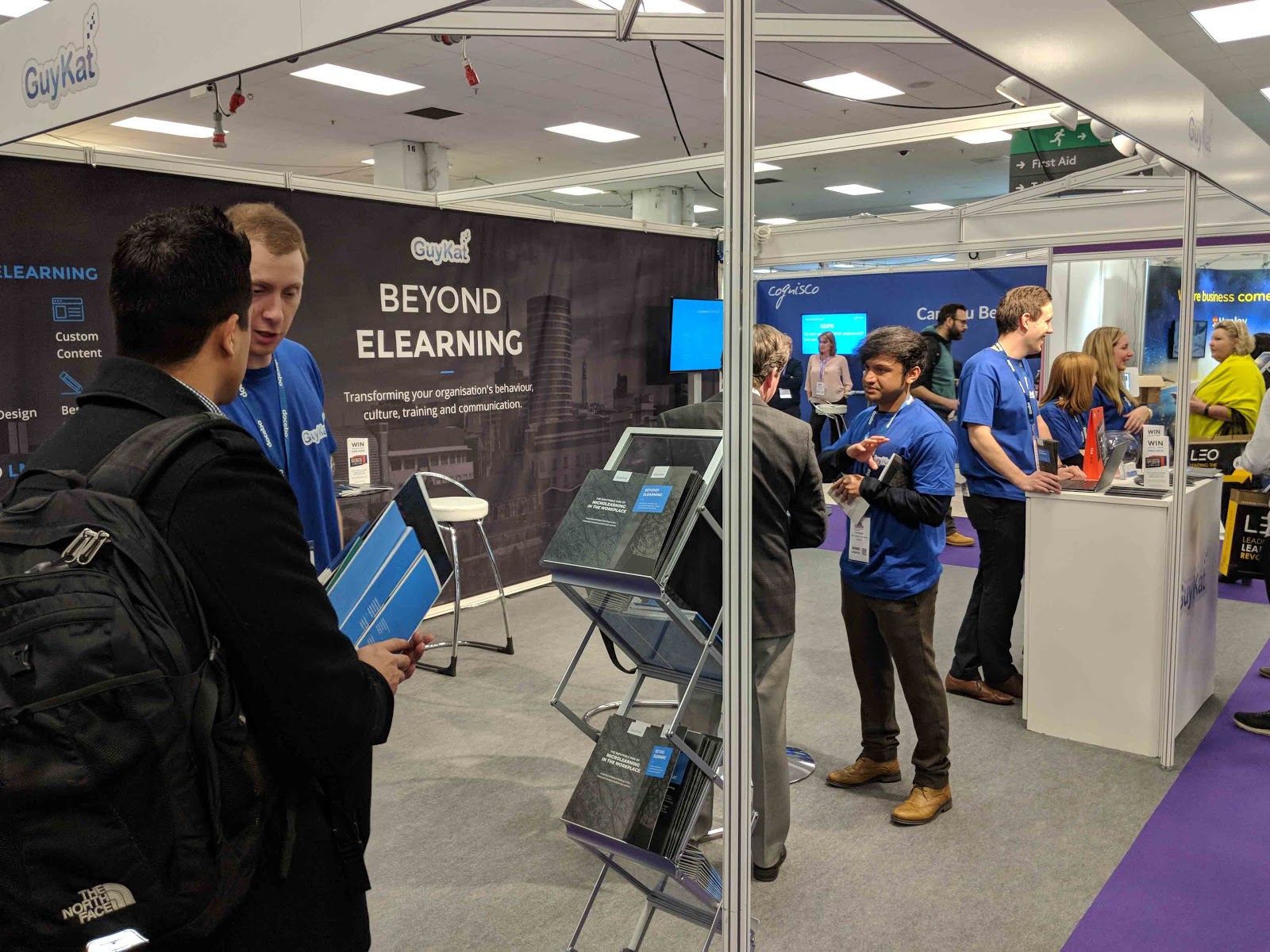
For the past four years at Learning Technologies the GuyKat team have co-manned the Docebo stall. We’re proud to partner with Docebo and the arrangement meant our pitch has always previously focussed on our LMS product. This year we wanted to raise awareness of the other big part of our business; bespoke eLearning. So, for the first time we exhibited on our own stand, under our own brand.
We marked this milestone with the UK launch of our white paper on the importance of microlearning in the workplace. On the back of this release many people came to see us to find out more, most specifically how to access help in implementing a microlearning strategy in their own organisations. If you weren’t able to attend and want a soft or hard copy of the white paper, do please get in touch and we’ll be happy to send one through.
We also had some great conversations with Docebo customers who had heard about some of the customisation work we’ve been able to do for for other clients and wanting to know if we could help take their installation to the next level. We’re looking forward to working with them.
One thing that attracted a lot of comment was our tag-line. The most common question from walk-bys to the stand was “What do you mean by ‘Beyond eLearning’?” We were asked so often that the answer, which gets to the very core of what GuyKat is all about, justifies an entire dedicated future blog post. Watch this space.
It’s always great to be part of this key industry event. Being surrounded by your clients, potential clients, partners and the competition is energising. Looking at competitors left us with a healthy balance of feeling very, very self-assured about the quality and pricing of our work, whilst still giving a gentle nudge that if we want to keep that feeling we need to retain our level of innovation. We’re up for the challenge. See you at LTUK19!
If our services sound of importance to you, please get in touch with me at george.atkin@guykat.com and we can discuss your next steps in eLearning!
Finally, congratulations to the two lucky winners of our prize draws for the Amazon Fire!

Why buy SaaS as a VAR?

Why would anyone buy a B2B SaaS product from a VAR (value-added reseller) rather than direct from the vendor? This is something I’ve been grappling with for two good reasons; Firstly, my own business uses SaaS solutions for all sorts of non-core, yet still crucial, business processes. Our accounting, CRM, email, file-storage and HR processes, amongst others, are all underpinned by various SaaS products. I’ve a huge vested interest in getting the best value from these ongoing investments. Secondly, my business itself is a VAR for a SaaS product. If I can’t articulate the benefit, I don’t deserve to be in the game.
Thinking of the products we’ve bought into, my answer has to be nuanced. Sometimes it makes sense to go direct, sometimes it makes sense to go with a VAR. I think of it like this: The closer your requirements are to the vendor’s standard use-case, the weaker the case for a VAR. There is nothing remotely unusual about the way I use my accounting, email or HR packages. I’m not integrating them with any other system. I’m entirely happy with the level of look and feel customisation I can do myself. The software is straightforward enough I can do everything I need to without training or guidance. So, the only reasons I would go with a VAR would be if they could beat the direct sales force on price (unlikely, but sometimes possible), or if I needed to contract in a particular currency, or with a legal entity in a named geography, and the direct sales operation were not set-up to support that.
However, once you get a little further away from the providers’ standard use-case scenario, or the closer the service is to a genuine core or customer-facing function in your business, the case for using a VAR begins to swing back in their favour.
- Do you have complexities of integrating with other systems?
- Do you want different payment terms to those that may be offered by the vendor directly?
- Do you have concerns about training your team to administer the product?
- Even if fully trained, do you have concerns about the capacity of your team to administer the product? Does this create an opportunity cost in time against their primary role?
- Do you want to customise the product’s look, feel or even functionality beyond the standard offering?
- Do you want a partner who has the time to more deeply understand your individual business, available resources and unique success criteria and then best mould the solution to reflect them?
- All SaaS products evolve over time. Do you have the headspace to think through how the product roadmap and future releases will introduce both risks and opportunities to your solution. Do you fear not having the bandwidth to spot and plan for these?
- Do you need support in bridging the gap between what the SaaS product delivers, and the manual and people factors outside the software that link together and make your overall business tick?
Answer yes to any of the above, and it is certainly worth thinking about a VAR. In our case, our CRM software could have been bought off-the-shelf, but we also needed guidance on process changes - ideas for content marketing, and an implementation strategy tailored to our business. These things wouldn’t have been well served by the generic online self-help, or the standard installation package from our chosen CRM vendor. With only a marginal uplift in initial cost, a VAR offered the opportunity to get a deeper level of tailored implementation support. This went beyond just a CRM implementation, and became a whole re-engineering of our end-to-end marketing, sales and customer success processes that happened to leverage a particular CRM tool we had our eye on. So for us, when looking at CRMs, a VAR was absolutely worth talking too.
Before I started my business, I used to work on big change management projects, often revolving around IT solutions for large, complex, multi-national organisations. We had a saying that change was all about getting all three components of people, process and technology right. Any project that focussed on the technology, but neglected the people and process, was doomed to fail. Buying a SaaS solution will often nail the technology part, but if you want to release the full benefits of the solution you need to get the supporting people and processes right too. This is where an experienced VAR puts the ‘V’ for ‘Value’ into the acronym.
GuyKat are a VAR of Docebo, a SaaS Learning Management solution. In a future post I'll explore the value we can add to your project to implement a training and content strategy or partner-enablement program, above and beyond the procurement of the software.
This post was written by GuyKat CEO Guy McEvoy, to find the original piece, click here

A Look Back at DoceboInspire 2017
A look back at DoceboInspire 2017
DoceboInspire 2017 brought together over 300 Learning and Development professionals for two days, exploring a wide range of eLearning and training topics. The event took place in Boston, MA and included a Harbour yacht cruise to host the inaugural DoceboInspire Awards ceremony. GuyKat is a proud partner of Docebo, so I caught up with the some of the team who were lucky enough to attend the event..
Guy, CEO of GuyKat:
“It was quite something to be surrounded by so many of Docebo’s clients from all over the world. They all use the system for slightly different purposes but the common theme was their enthusiasm for the tool. I feel lucky to have been at the birth of this great new community. I look forward to future events.”
David, eLearning Consultant:
“Docebo Inspire was a great event. It was really exciting to meet so many people in the industry who are using Docebo and find out about their specific projects - there are so many different use cases!”.
It was a truly inspiring event allowing L&D professionals to attend sessions and talks from key speakers, including Claudio Erba, the CEO of Docebo. Some of the topics discussed included microlearning and the future landscape of learning. Check out our new white paper on ‘The Inevitable Rise of Microlearning in the Workplace’ to hear more about this. Email josie.wood@guykat.com for a copy!

Perform - Brilliant new feature for Docebo 7.0
Perform - Brilliant new feature for Docebo 7.0
In its latest release, Docebo introduces the Perform module which brings talent management capability to the Docebo LMS.
What is Perform?
Perform is a new feature on the Docebo LMS that is designed to allow you to evaluate your employee’s competencies and detect skill gaps. Once the skill gaps are detected, you can then intervene, offering learning and development opportunities. This could be done through formal learning plans and courses, or more informal videos or documents.
Some of the exciting features Perform has, include:
- An off-the-shelf skills catalogue
- Ability to create, import, and edit your skills and roles in bulk
- Ability to assign skills to roles
- You can map courses, learning plans, and informal learning assets
- Rating Scale
- Skill evaluation status monitoring
- Skill evaluation calibration
- Skills gap analysis
- Skills, roles and gaps reporting
A particular feature we thought was great, was the ability to enrol a user with a specific skill gap to a course or learning plan that will support in filling the gaps in their knowledge.
GuyKat are a UK based Docebo partner who work with clients globally. We can support organisations with their implementation of the Docebo platform, including the perform module featured above.
How you can get access to it
It’s simple. Email david.brannon@guykat.com to set up a tailored webinar. David would love to give you a demonstration of the platform and its awesome new features, including Perform!

Good vs. Bad User Experience
Good vs. Bad User Experience
Our talented eLearning designer, Zoe Hall, explains what makes a negative user experience and offers tips on how she approaches building an effective user experience.
"A User Interface is like a joke. If you have to explain it, it’s not that good."
It's useful to understand the difference between the terms User Interface (UI) and User Experience (UX):
- UI – the product used to access the content – e.g. website, app, game, LMS etc.
- UX - the entire experience the user has whilst navigating the through UI product, and the associating feelings and behaviours.
The UI in eLearning can have a huge impact on the quality of the UX. It can be the difference between an engaged and a distracted learner. A lot of thought should be put into selecting the most appropriate UI format. This provides a strong foundation that will allow the eLearning to be easy to navigate. Anything counterintuitive in the UI is distracting.
What makes a bad eLearning UX?
- Overly complex content
Being faced with too much information will overwhelm the learner from the outset. Nobody wants to endure paragraphs of text. As best practice, making sure the content is succinct is crucial.
Our clients are subject matter experts. They know their stuff! They provide us with the meaningful content their learners need to grasp. My job is to convert detailed information into digestible eLearning that is quick to access and easy to understand.
- A repetitive, predictable layout
Learners may lose concentration if the flow of the course becomes too predictable. For example, placing the Next button in the same position throughout the course is consistent and considered good UI 99% of the time. However, for complex, technical or compliance training, the risk is that a less diligent learner becomes disengaged. An overly consistent UI can make it too easy to mindlessly skip content. In these cases, it can make sense to play around with the layout.
I use a variety of methods to engage the learner. For example, changing titles of the buttons to Click for more information to reveal hidden material. Regardless of the layout, button style, feedback methods and colour themes are all factors that should remain constant through the eLearning experience. I use client brand guidelines to ensure that the training looks professional and on brand.
- Ineffective instructional design
A client can provide the most detailed and expert information on a topic, but without a logical UX, the information is useless. The content must be formatted in a layout that makes sense to the user to transform the information into retained knowledge. For example, using a mobile phone has become such a common activity for us all, so it makes sense for eLearning to be accessible on numerous devices. eLearning modules that are responsive on desktop, tablet and mobile will likely reach more learners. GuyKat storyboard with clients to ensure that our designs meet the needs of your users.


- When the user asks "What do I do now?"
If users are left asking: "What do I do now?" when working through a course, then the eLearning has failed. A confused user = a lack of concentration.
The navigation must be simple to follow. If presented appropriately, the navigation should speak for itself and not have to be explained.
- Difficult to retain information
The learner can miss out on meeting the learning objectives. This may be due to them skipping their way through the course, or just skimming over the valuable and insightful text. This is one of the biggest challenges in eLearning, as it can be difficult to gauge whether the learner is truly engaged.
A great way to resolve this is using a great LMS. It's important to appreciate that the user experience begins even before the eLearning has been accessed. The LMS should have seamless navigation that should come intuitively to users. GuyKat are proud UK partners of Docebo. We love Docebo because the UX means learners get to the content effortlessly. With many other LMS solutions the user may start off in the wrong mindset because they've just had a horrible UX before they've even launched the beautiful content we have built. This is a shame. If your LMS has a bad UI your overall learning journey will still be a bad UX, so you need to dump it.
Zoe’s steps to creating an effective user experience
1. Produce a plan
I begin by writing a detailed script then I start designing. I create a storyboard and evaluate the best interactions for your content.
2. Construct the right interactivity for the learning objective
Some authoring tools provide plenty of interactive opportunities, whilst others come with limitations. If my authoring tool does not allow me to create a certain interaction, then Ill explore how else I could make it work, I don't limit myself.
3. Always carry out Quality Assurance
Its true that your eyes read what they want you to see. Sometimes a fresh pair of eyes can pick up things that are easily missed. I always ask for thorough feedback and the QA team at GuyKat are happy to help. The pickier, the better.
4. Draw inspiration from other sources
If I come across a well-designed website or if an advertisement catches my eye, I make a note of what I liked about it, what was attractive about it. I carry these ideas into my designing when I need some inspiration.
Summary
Its important to not become complacent when designing eLearning, so by putting myself in the eyes of the learner, I make sure the UX is consistent, interesting, interactive and engaging to meet the client's objectives.

Rose's summer internship at GuyKat
GuyKat offer an internship programme whereby we tailor the role and responsibilities around the individual’s skills and interests.
Rose is coming to the end of her internship with GuyKat, here’s what she got up to during her time with us:
 What attracted you to the role at GuyKat?
The role stood out to me because it offered me a broad range of responsibilities. After finishing university, where I studied Business and Public Relations, I wanted to gain more experience and improve my communication skills. The role at an eLearning agency, such as GuyKat, gave me the opportunity improve my B2B marketing skills, but also apply my communication skills to writing scripts for some of the biggest brands in the world.
What were the main tasks you were given?
On a day-to-day basis, I regularly carried out market research to identify prospective customers. I’d also support the business with administrative tasks such as working on invoices and producing overviews on Excel. I wrote numerous blog posts which provided rich content for the GuyKat website, but also shareable content for the social media pages. I enjoyed having the responsibility of updating the GuyKat Twitter feed with news about the company and the eLearning industry. I was even lucky enough to attend an eLearning exhibition London, where I learnt about the latest trends and topics in the Learning and Development sector, and attended numerous talks from leading industry experts.
What were of your highlights during the internship?
I particularly enjoyed helping the GuyKat team with the task of script-writing! This involved taking subject-specific information from one of the biggest FMCG brands, and scripting it into easy-to-understand text. It was more difficult than I thought it would be, but I really enjoyed the challenge of making it as concise as possible. This was a highlight for me because I felt deeply involved with helping the eLearning team on one of their fast-paced projects. I gained a real insight into what is required for effective eLearning.
What did you enjoy about working with GuyKat?
The best part about my time at GuyKat was working with the brilliant team. I was introduced to everyone on my first day, it was clear there was a variety of roles across the business - from eLearning designers to business consultants. They are the friendliest bunch, and what really impressed me, was their expert knowledge in what they do. The eLearning developers create beautiful designs whilst the Docebo support team can apply their expert knowledge to solve problems quickly. Being able to work in such a motivated, hard-working team was really encouraging. They really are a pleasure to work with.
Any advice or tips for students or graduates looking for a career in marketing or communications?
My advice would be to gain as much experience as possible, especially in varying industries. Having some solid experience will provide you with skills that you will not have gained at college or university. These skills will also stand out to a potential employer, making you more likely to get hired. Gaining experience in different industries will help you to decide which path you want to take in future.