

“Docebo Harmony Search Will Do Everything for You.”
Let’s Talk About That.
PEACE, LOVE, & HARMONY
Docebo Harmony Search explained: What does it really mean for L&D teams?
‘Upheaval’; the word is being thrown around a lot in the world of Learning & Development. An upheaval tends to result in an evolved landscape, but they aren’t always fun to live through. Revolutions drive progress, but they’re chaotic; the AI revolution is no different.
In the midst of this, what we need is a moment of calm. An oasis of serenity. A sense of Harmony.
Harmony Search is Docebo’s intelligent assistant capable of drastically reducing the amount of administrative overhead involved in running a training platform. Harmony Search is young, but even in this early stage of its evolution, it offers a look at how AI can (and will) transform the way human beings interact with their training environment.
Here at GuyKat, we’re eager to provide some tips on how to maximize its impact.
How can you get the most out of Harmony Search?
After a decade in L&D, I know directing learners to required material can be an uphill battle. Training platforms often become tick-box exercises, forcing learners to need direct links to exactly what they must complete. Creating a platform for self-sufficient exploration is a devious challenge.
Part of the problem lies in how search systems have worked historically. Many platforms rely on simple keyword searches that depend on exact titles or metadata. If a learner doesn’t know the precise wording of a course, finding the right training can become frustrating.
Harmony changes this approach to a more conversational AI interface. Learners can ask questions naturally. Harmony then analyses the meaning behind the question and searches across the learning content available on the platform.
Video transcriptions and parsed Elearning material powers its responses to direct learners towards the training most relevant to their query. Harmony endeavours to understand why a learner is asking about a topic, and curates its suggestions based on its understanding of all the learning content available to the learner.
Harmony Search allows the learner to type in their question or statement and receive curated replies based on training content:

Alternatively, the ‘Ask Harmony’ feature provides conversational answers, summarising information drawn from the platform’s learning content while linking directly to relevant training materials.
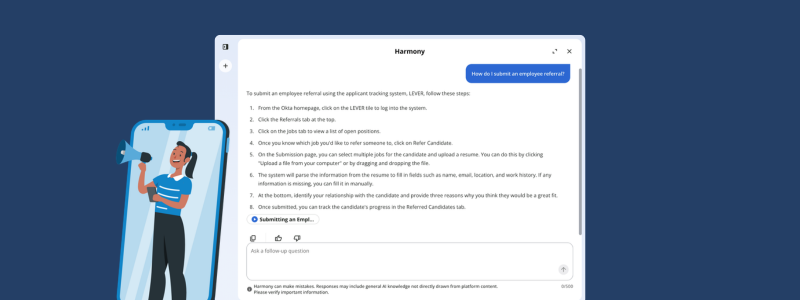
After experiencing this kind of search, traditional keyword-based systems can feel surprisingly limited.
Harmony is powerful, if you design for it
However – In the construction of the Docebo platform, Harmony is here as an assistant, not the architect. While Harmony introduces powerful AI capabilities, it doesn’t remove the need for good platform management; in fact, the opposite is true.
Earlier I mentioned that Harmony curates its responses based on its understanding of content available to the learner; either from content learners are currently enrolled in, or from all training that is available to them within the platform. In both cases, the quality of the responses depends heavily on how well the learning content has been maintained. You’ll need to ensure the content is accessible to learners if they’re going to benefit from Harmony’s great big AI brain.
Outdated courses, duplicate materials, or inconsistent metadata can all create confusion for AI-driven recommendations.
In other words, AI won’t fix bad configuration. But GuyKat can!
Preparing your Docebo to make the most of Harmony
Harmony is a deeply impressive leap into the evolution of L&D platforms. But we can’t just switch it on and let it do all the work; it needs us to build the platform on which it stands.
Harmony can generate answers based on general knowledge when it cannot find relevant information within the platform itself. Administrators can choose whether to allow this behaviour or restrict Harmony to responding only with information drawn directly from platform content.
- Allowing general knowledge responses can make Harmony feel more flexible and helpful when learners ask broader questions.
- Restricting responses to platform content ensures that answers always remain grounded in your organisation’s official training materials.
Fortunately, Harmony comes with a ‘Preview’ mode which can be activated just for the Superadmins on the platform; meaning the top-level Administrators can test out the new AI functionalities without learners being impacted. For many organisations, this testing phase becomes an opportunity to review the health of the learning platform as a whole.
Wondering if you need to spruce up the platform to maximise Harmony? Check out our article on Governance!
How can GuyKat help?
At GuyKat, we work with organisations to optimise their Docebo platforms, improve governance, and ensure new features like Harmony deliver real value for learners and administrators alike.
If you’re exploring Harmony or planning to enable AI features within your platform, we’d be happy to help you get the most from it, contact us today.
Docebo is clearly committed to thoughtful AI integration. These training platform evolutions are designed to accelerate the human experience, not replace it. Though it’s a time of change, have no fear; GuyKat will help L&D embrace this new paradigm.
Harmony Search is only the start, AI is integrating everywhere, and for professional development, it’s an opportunity, an ally, a friend, not a threat.
Want to talk to a real human about it?
GuyKat are here to help with any professional learning solutions you may require. As one of our LMS Analysts, Leo is usually found studying up on Docebo and chatting through solutions with clients and his fellow teammates. Off the clock, he enjoys writing, films, and walking his very spoiled dog. If you’re interested in having a discussion about supercharging your training platform, or getting dog pics, get in touch today!